Home → Case Studies → CEO Command Center

CEO Command Center
A One-Page Exec Dashboard in Notion

She opens it Monday morning and sees what's at risk, what's due in the next two weeks, and which decisions are waiting on her, without asking anyone.

1Page, One Scroll
6Live Views, 3 Sources
0Tasks Without an Owner
The Problem

Challenge

A weekly exec meeting ends with a dozen commitments, two open disagreements, and a board deck due in nine days.

  • The CEO of a Series B SaaS company (fictional Northpine Labs) had no single place to see where everything stood.
  • Action items lived in meeting notes, deadlines lived in calendars, and decisions lived in people's heads.
  • One task, a new procurement process, was assigned to "someone." In a real company, that's the one that quietly never gets done.
What I Built

How It's Built

Step 1 · Capture

Meeting to Data

Turned the exec staff transcript into structured records: every priority gets a DRI, status, due date, and area.

Step 2 · Store

3 Source Databases

Priorities, a Decision Log, and Key Dates, kept on a separate data page so the CEO never edits the source by accident.

Step 3 · Surface

Filtered Linked Views

Each dashboard section is a live, filtered view of the source data. Update a row once and every view updates.

Step 4 · Check

The DRI Check

A view that shows only tasks with no owner. When it's empty, nothing is floating.

Northpine Labs is a fictional company. All people, numbers, and deadlines are mock data so the build can be shared publicly.

The Output

The Dashboard
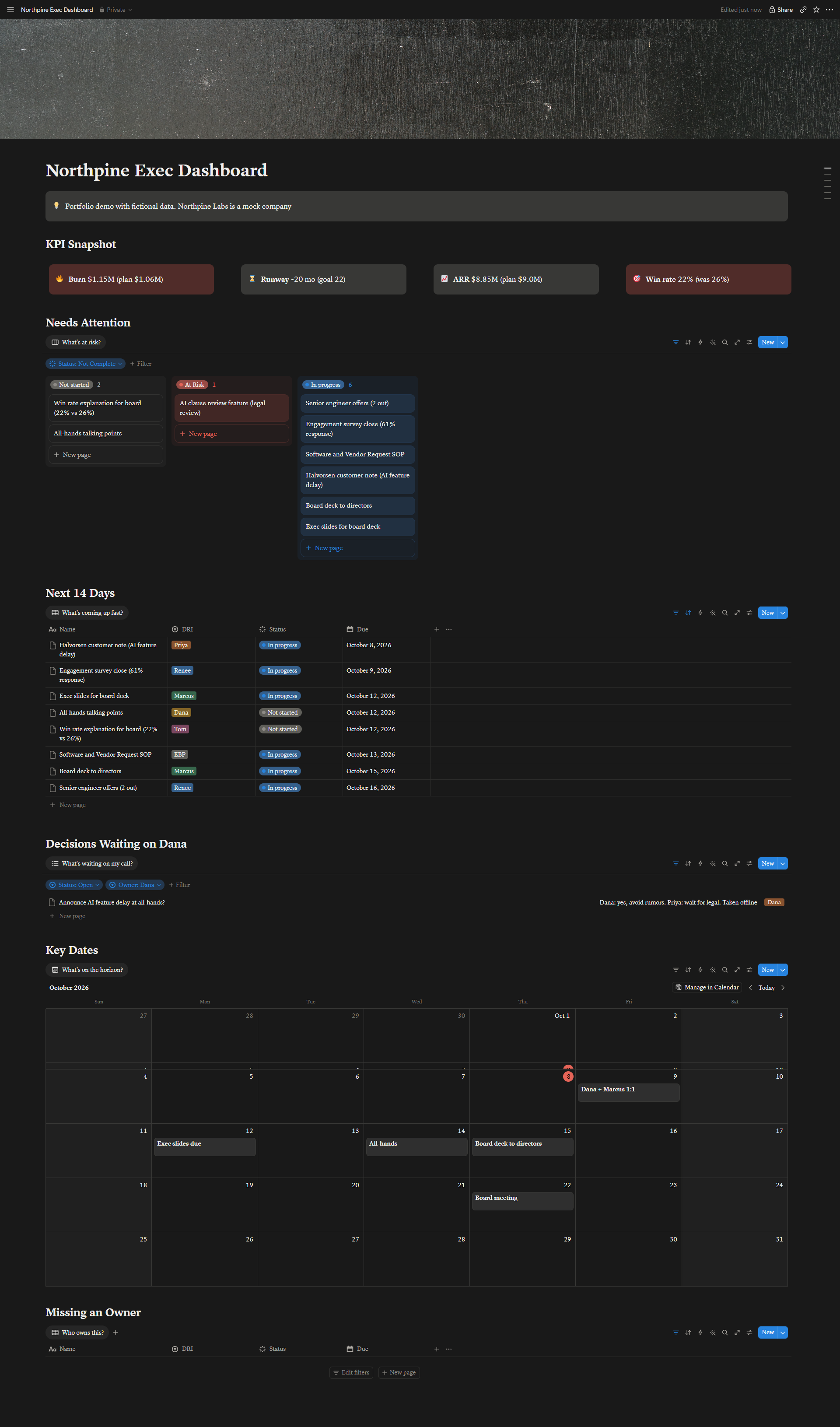
Northpine Exec Dashboard in Notion: KPI callouts for burn, runway, ARR, and win rate; a risk board grouped by status; a 14-day deadline table; open decisions; a key dates calendar; and an empty Missing an Owner view.

Scroll to see the full page. Open full size →

Designed Around Her Questions

What the CEO Sees

Every section is named for the question it answers, in the CEO's own words.

KPI Snapshot
How are we tracking?

Burn, runway, ARR, and win rate against plan. Off-plan numbers are colored red, because execs read color before numbers.

Board View by Status
What's at risk?

Every open priority grouped by status, including high-priority work that hasn't started yet, so nothing risky hides.

Table, Sorted by Due Date
What's due in the next two weeks?

Only name, owner, status, and due date. Skimmable beats complete.

Decision Log, Filtered
What's waiting on my call?

Only the open decisions she owns, with the context of each so she can decide without digging.

Calendar
What's on the horizon?

The 1:1, slide deadline, all-hands, board deck send, and board meeting on one calendar, with prep flagged.

Unassigned Filter
Who owns this?

The procurement SOP had no owner in the meeting. I claimed it as the EBP, so this view is empty. That's the point.

Why It Matters

The EBP Skill Behind It

The dashboard is the easy part. Knowing which three questions a CEO asks on Monday morning, catching the task nobody owns, and noticing when a "decision waiting on her" actually belongs to someone else is the judgment I bring. In review, I also moved not-started, high-priority work onto the risk board, because work that hasn't started is often the real risk.

Design Choices

  • Source data and dashboard kept on separate pages
  • Every view filtered to one question
  • Red only where numbers are off plan

Next Iterations

  • Relations linking each key date to its prep priorities
  • Feed my meeting-prep automation from the Key Dates database
  • Weekly digest of new risks and open decisions

Tools

Notion DatabasesLinked ViewsBoard & Calendar LayoutsFilters & Sorts
More Case Studies

Related Work

AI Ops Toolkit

The meeting summary, board-prep brief, and SOP built from the same exec meeting.

See the toolkit →

Exec Meeting Prep Brief

Calendar to Airtable to AI to Slack: a brief for every external meeting, 24 hours ahead.

See the build →

Governance + Board Ops

The real-world agendas, decision tracking, and materials cadence behind this dashboard.

100% Quorum →